Phone numbers
Your organization can buy US local phone numbers from Resia. Each number that you buy supports calls and text messages. You can also add your own numbers on a SIP connection. See Your own numbers. Use a number to:
- Call from it, with
from_phone_numberon a call or a call batch. - Answer calls to it with a Call Agent.
- Answer text messages to it with a Chat Agent.
- Send text messages from it, after you put it on a 10DLC campaign.
A number with a human text receiver refuses Chat Agent assignment and new AI SMS chats with 409. Voice calls remain independent.
Buy a number
Search by area code, city, or state, then order the number. The carrier completes the order in the background, usually within a minute. A number costs one month when its order completes, then one month on the same day of each later month until you release it. See Buy a phone number for the steps.
Your own numbers
A number can stay on your own carrier or phone system. Connect that carrier to Resia with a SIP connection, then add the number to the connection. See Connect your own number for the steps.
- Resia charges no monthly rent for your own number. Calls on it have their own price per connected minute. See Billing.
- Resia does not send or receive texts on your own number. You cannot put it on a 10DLC campaign.
- If the SIP connection has no outbound details, the number is inbound-only. It answers calls, but it cannot place calls.
DELETE /v1/phone-numbers/{phone_number}removes your own number from Resia at once. Your carrier keeps the number.
Assign agents to a number
A number can have one inbound Call Agent and one inbound Chat Agent at the same time. In the portal, open Numbers, then select Manage next to the number.
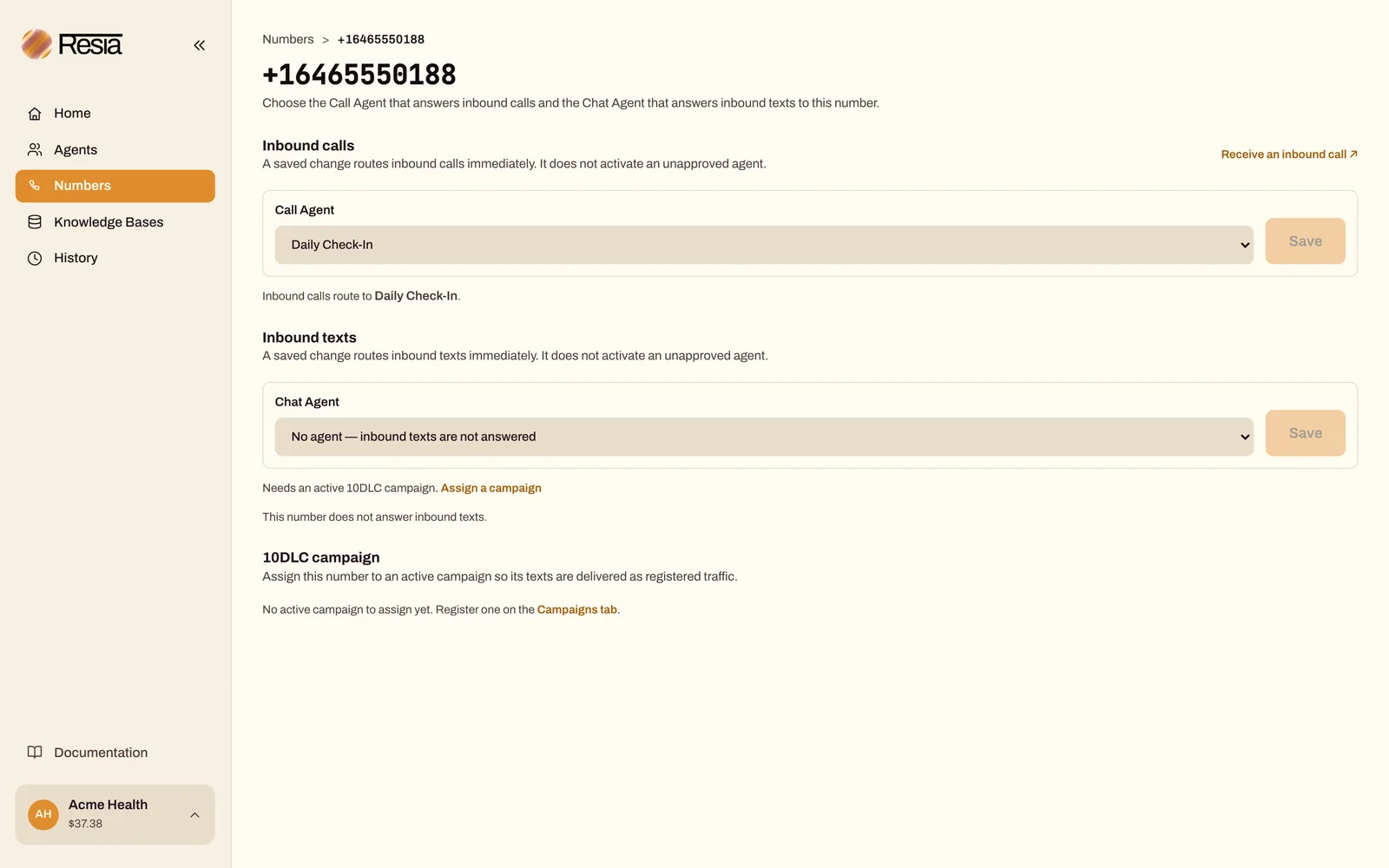
A Chat Agent can answer text messages only on a number that is on an active 10DLC campaign. Until then, the portal locks the Chat Agent choice and says why: Needs an active 10DLC campaign, or Waiting for the carrier to finish the 10DLC campaign assignment. Put the number on a campaign in the 10DLC campaign section of the same page.
With the API:
curl --fail-with-body --silent --show-error \
  --request PATCH "$RESIA_API_BASE/v1/phone-numbers/+12125550199" \
  --header "Authorization: Bearer $RESIA_API_KEY" \
  --header 'Content-Type: application/json' \
  --data '{"inbound_call_agent_id": "CALL_AGENT_ID", "inbound_chat_agent_id": "CHAT_AGENT_ID"}'
- The path is the full number in E.164 format, not an ID.
- A field that you leave out does not change.
nullstops that kind of inbound traffic on the number.- An agent with a required input must have an
inbound_input_webhook_url. Otherwise Resia refuses the assignment with422. An agent whose inputs are all optional needs none. - A Chat Agent can be assigned only to a number that is
ASSIGNEDon an active 10DLC campaign. Otherwise Resia refuses the assignment with422.nullalways clears it. tagsreplaces all of the number's tags. See Tags.
Callbacks
People often call back the number that called them. What they reach depends on the number's inbound_call_agent_id at that moment, and on whether an orchestration run registered the caller on the number:
- The number has an inbound Call Agent. That agent answers. When no run registered the caller, the callback is a new inbound call. It has no link to the earlier outbound call or batch, so the agent does not know about the earlier call. To give the agent that context, use an
inbound_input_webhook_urlthat looks up the caller's number. See Give an inbound agent details about the caller. - The number has no inbound Call Agent. The call rings, and nobody answers. Resia does not take a voicemail message.
- An orchestration run registered the caller on the number. The number's inbound Call Agent answers with the inputs that the run gave. Resia does not call the
inbound_input_webhook_urlfor that call, and the run gets the call's outcome when the call ends. See Preserve context between calls.
To handle callbacks, place outbound calls from a number your organization owns, and assign an inbound Call Agent to that number. should_leave_voicemail applies only to outbound calls. It does not answer inbound calls.
Costs
Resia charges a number's first month when its order completes. Each later month is charged on the same day of the month as the purchase. In a shorter month, the charge comes on the last day of that month, and the next month returns to the purchase day: a number bought on January 31 renews on February 28, then on March 31. Numbers bought before this billing change took effect, in October 2026, renew on the 1st. List the charges with GET /v1/phone-number-charges; rental_month is the first day of the month that each charge pays for.
Release a number
DELETE /v1/phone-numbers/{phone_number} releases a number at once. For a number that you bought from Resia, release stops its later monthly charges. The month already charged is not refunded.
Release of a bought number cannot be undone, and it gives no refund. Resia refuses a release with 409 while unfinished batch calls or texts still need the number.
Your call history and past charges stay. Release limits for bought numbers apply per hour, per day, and per 30 days. See Rate limits.
For your own number on a SIP connection, the same request removes the number from Resia at once. Your carrier keeps the number, no release limit applies, and you can add it again later. See Connect your own number.
Number format
Resia reads every phone number in E.164 form: a +, the country code, and the number, with digits only and no spaces or dashes.
- A
+1number has exactly 10 digits after the1, such as+12125550142. - Any other number has 7 to 15 digits after the
+, and its country code starts with a digit from 2 to 9, such as+447911123456.
A request with a number in any other form is refused with 422. This format rule is separate from where Resia calls and texts: Resia places calls to United States and Canada numbers only, and sends text messages to United States numbers only.
Guides
- Buy a phone number
- Connect your own number
- Receive an inbound call
- Answer texts to your number
- Register for 10DLC texting