Register for 10DLC texting
US carriers require every business that texts from a local 10-digit number (a "10DLC" number) to register. Unregistered texts are filtered or blocked. You register in three parts:
- A brand: your business identity. One per organization.
- A campaign: what you send, and how people agree to receive it.
- Numbers: the Resia numbers that send for that campaign.
You can do all three through the API. Registration fees go to the carrier registry. They are charged to your prepaid balance and are not refundable, even if carriers reject the registration.
Sole proprietors and publicly traded companies cannot register through the API yet. Contact support@resia.ai. Contact support also if you already registered a brand somewhere else.
1. Register your brand
The brand is the legal business behind the texts. The registry checks the details against public records, so enter them exactly as your company is registered.
You can also register the brand with a form in the portal, under Numbers.
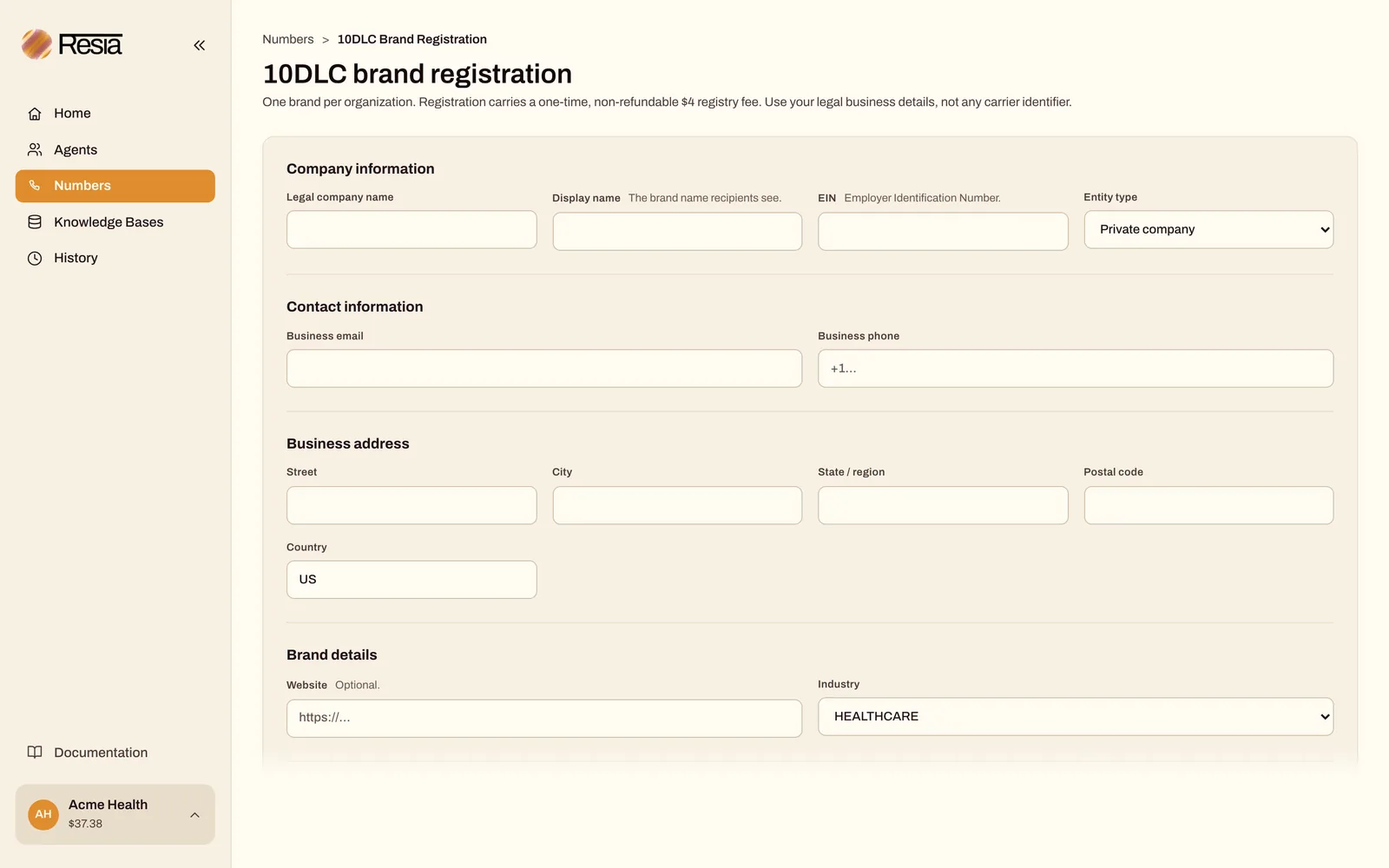
With the API:
cat > brand.json <<'JSON'
{
  "entity_type": "PRIVATE_PROFIT",
  "display_name": "Midtown Eye Care",
  "company_name": "Midtown Eye Care LLC",
  "ein": "12-3456789",
  "street": "100 W 40th St",
  "city": "New York",
  "state": "NY",
  "postal_code": "10018",
  "country": "US",
  "email": "office@midtowneyecare.example",
  "business_phone": "+12125550100",
  "vertical": "HEALTHCARE",
  "website": "https://midtowneyecare.example"
}
JSON

curl --fail-with-body --silent --show-error \
  "$RESIA_API_BASE/v1/10dlc/brand" \
  --header "Authorization: Bearer $RESIA_API_KEY" \
  --header 'Content-Type: application/json' \
  --data-binary @brand.json
entity_type is PRIVATE_PROFIT, NON_PROFIT, or GOVERNMENT. Brand registration has a one-time $4 registry fee.
Check verification with GET /v1/10dlc/brand. It usually finishes within minutes, but it can take days.
2. Register a campaign
First, list the campaign types that your brand qualifies for, with their current fees:
curl --fail-with-body --silent --show-error \
  "$RESIA_API_BASE/v1/10dlc/campaign-use-cases" \
  --header "Authorization: Bearer $RESIA_API_KEY"
Each use case has a quarterly_fee. This is the upfront, non-refundable three-month fee. Copy it into confirmed_upfront_fee when you register. If the live fee changed, Resia charges nothing and answers 409.
cat > campaign.json <<'JSON'
{
  "usecase": "CUSTOMER_CARE",
  "description": "Appointment reminders and replies to patient questions for Midtown Eye Care.",
  "sample_messages": [
    "Midtown Eye Care: your appointment is tomorrow at 3:30 PM. Reply C to confirm or STOP to opt out.",
    "Midtown Eye Care: thanks, your appointment is confirmed. Reply HELP for help or STOP to opt out."
  ],
  "message_flow": "Patients give their mobile number and check an unticked consent box on the booking form at https://midtowneyecare.example/book. The box says they agree to receive appointment texts, that message and data rates may apply, and that they can reply STOP to opt out.",
  "help_message": "Midtown Eye Care: for help call +12125550100. Reply STOP to opt out.",
  "optout_message": "Midtown Eye Care: you are unsubscribed and will get no more texts.",
  "privacy_policy_link": "https://midtowneyecare.example/privacy",
  "terms_and_conditions_link": "https://midtowneyecare.example/sms-terms",
  "confirmed_upfront_fee": "6.00"
}
JSON

CAMPAIGN_REQUEST_KEY=$(uuidgen)

curl --fail-with-body --silent --show-error \
  "$RESIA_API_BASE/v1/10dlc/campaigns" \
  --header "Authorization: Bearer $RESIA_API_KEY" \
  --header 'Content-Type: application/json' \
  --header "Idempotency-Key: $CAMPAIGN_REQUEST_KEY" \
  --data-binary @campaign.json \
  --output campaign-response.json
- Replace
6.00with thequarterly_feefrom the listing. Idempotency-Keyis required. If the request fails or times out, run the samecurlcommand again. It reusesCAMPAIGN_REQUEST_KEY, so Resia returns the original registration and never charges twice.- Registry and carrier review take hours to days. Follow it with
GET /v1/10dlc/campaigns/{campaign_id}.
Campaign status is pending review, active, rejected, suspended, or expired. Only an active campaign delivers texts.
An unclear consent description is a common reason for rejection. Make message_flow describe exactly how a person agrees to receive texts, and make sure the privacy policy and terms pages are public and mention text messages.
3. Put your numbers on the campaign
When the campaign is active, attach each number that will send for it:
read -r -p 'Campaign id: ' CAMPAIGN_ID

curl --fail-with-body --silent --show-error \
  "$RESIA_API_BASE/v1/10dlc/campaigns/$CAMPAIGN_ID/phone-numbers" \
  --header "Authorization: Bearer $RESIA_API_KEY" \
  --header 'Content-Type: application/json' \
  --data '{"phone_number": "+12125550199"}'
Resia answers 202. Carriers finish setting up the number in the background, usually within a couple of hours. A number can be on only one campaign at a time. Check progress with GET /v1/10dlc/campaigns/{campaign_id}/phone-numbers.
Next steps
API reference: 10DLC Registration

