How Resia fits together
Resia separates what a conversation should do from each time it happens. You define an agent once, then start as many conversations with it as you need.
| You define | Each time it runs | Read more |
|---|---|---|
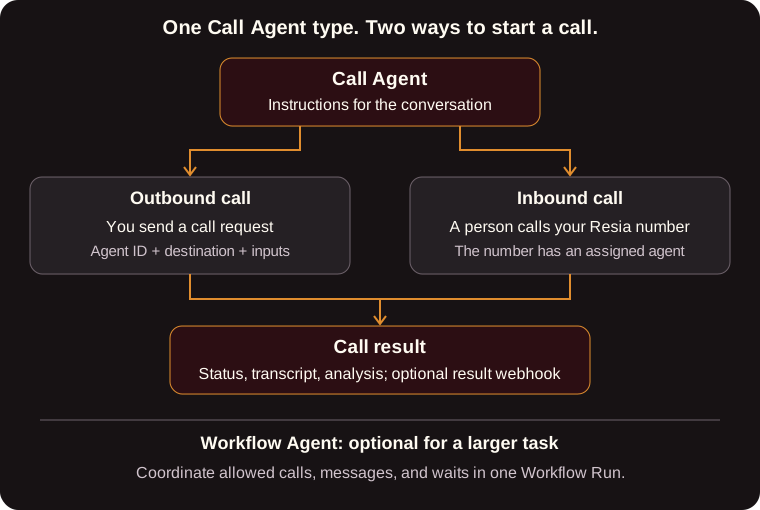
| Call Agent: instructions and settings for a phone conversation | Call: one attempt to place or answer a phone call | Call Agents, Calls |
| Chat Agent: instructions and settings for a text conversation | Chat: one SMS or web conversation | Chats |
| Workflow Agent: a multi-step task that can call, text, and wait | Workflow Run: one execution of that task, over minutes or days | Workflows |
Everything belongs to your organization: agents, calls, chats, runs, phone numbers, API keys, and the prepaid balance that pays for them.
Inputs, instructions, and analysis
Every agent has the same three parts:
input_schema: a JSON Schema (draft 2020-12) for the values each conversation receives, such as a patient's name or an appointment date. Instructions refer to these values as$nameor${name}.instructions: what the agent should say and do.analysis_promptandanalysis_schema: how Resia turns the finished conversation into a structuredanalysisobject, such as{"confirmed": true, "new_time": "3:30 PM"}.
Because the result is structured, your software can act on it directly without parsing transcripts.
Review and versions
When you create an agent or change its instructions, Resia saves a new version. A new version can need review by Resia before it runs. While it waits, the previous approved version keeps running, so an edit never takes a working agent offline.
Read review_status (pending_review or approved) and is_active on the agent to see where it stands. You never manage version numbers yourself.
Directions
- Outbound: you start the conversation with an API request:
POST /v1/calls,POST /v1/call-batches,POST /v1/chats, orPOST /v1/workflow-runs. - Inbound: a person calls or texts one of your Resia phone numbers. The agent assigned to that number answers. You assign agents with
PATCH /v1/phone-numbers/{phone_number}.
Getting results
Every call, chat, and run has an ID. You can:
- Poll it with a
GETrequest until it reaches a final status. - Receive a webhook when it ends. See Webhooks.
Both give you the same record.

