Let an agent answer from your data
An agent can look up your own data during a call or a chat, such as your services, locations, and prices. You publish the data as a JSON export at an HTTPS URL. Resia imports it into a knowledge base and reads the export again before each conversation that uses it. In this guide, you will publish an export, create a knowledge base, and use it on a call and in a chat.
Before you start
- Complete Get access. Keep that terminal open, with
RESIA_API_BASEandRESIA_API_KEYset. - An approved, active Call Agent. The Quickstart creates one.
- A place to publish a JSON file at a public HTTPS URL.
- A test call is a real call. Normal call charges apply.
Publish the export
The export is one JSON object. Every top-level value is an array of row objects:
{
  "services": [
    {"name": "Eye exam", "duration_minutes": 30, "price_usd": 120},
    {"name": "Contact lens fitting", "duration_minutes": 45, "price_usd": 90}
  ],
  "locations": [
    {"name": "Midtown", "address": "100 W 40th St, New York, NY", "phone": "+12125550100"}
  ]
}
Resia does not support other values beside the arrays. Change the file whenever your data changes. Resia reads it again before each call or chat that uses the knowledge base.
If your server sends an ETag or a Last-Modified header, change it when the export changes. Resia then sends a conditional request, and your server can answer 304 Not Modified to skip the download. Without a header, Resia downloads the full export each time. See Knowledge bases for the refresh rules.
Create the knowledge base
read -r -p 'HTTPS URL of your export: ' EXPORT_URL

jq -n --arg url "$EXPORT_URL" '{refresh_url: $url}' > knowledge-base.json

curl --fail-with-body --silent --show-error \
  "$RESIA_API_BASE/v1/knowledge-bases" \
  --header "Authorization: Bearer $RESIA_API_KEY" \
  --header 'Content-Type: application/json' \
  --data-binary @knowledge-base.json \
  --output knowledge-base-response.json

jq '{id, ready, last_source_version}' knowledge-base-response.json
Expected result: HTTP 201. Resia imports the export at once. ready is true when the first import worked. A knowledge base that is not ready answers no calls until a later refresh succeeds.
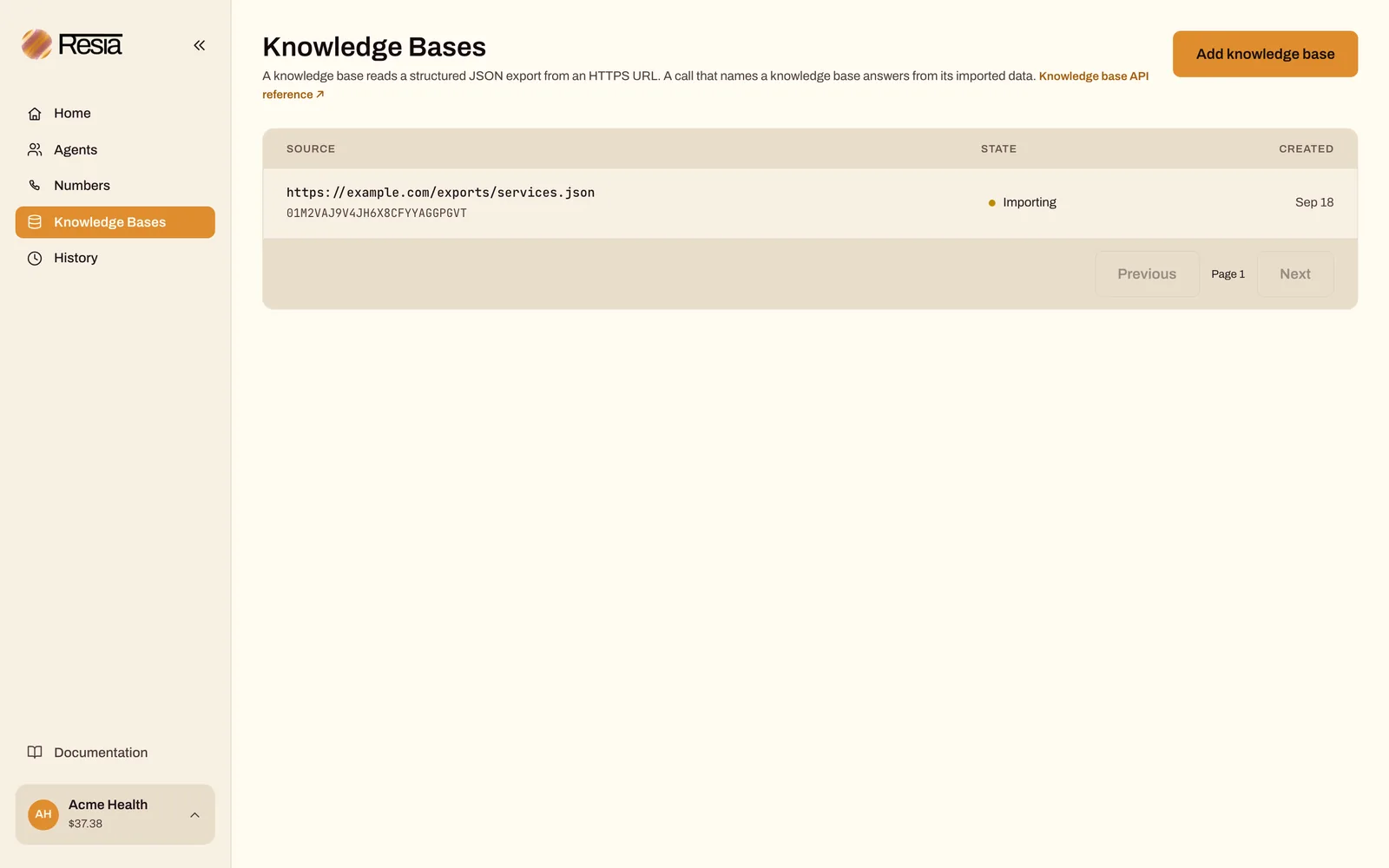
In the portal: open Knowledge Bases, select Add knowledge base, and enter the URL. The page shows the status and the imported version. Select Check again to read them again.
API reference: Create a knowledge base and Read one knowledge base.
Use it on a call
Pass the ID as knowledge_base_id when you place the call. The agent can then look answers up in your data during the conversation.
KNOWLEDGE_BASE_ID=$(jq -er '.id' knowledge-base-response.json)
read -r -p 'Call Agent id: ' CALL_AGENT_ID
read -r -p 'Your phone number, including + and country code: ' TO_PHONE_NUMBER
CALL_REQUEST_KEY=$(uuidgen)

jq -n --arg agent "$CALL_AGENT_ID" --arg phone "$TO_PHONE_NUMBER" --arg kb "$KNOWLEDGE_BASE_ID" \
  '{call_agent_id: $agent, to_phone_number: $phone, inputs: {}, knowledge_base_id: $kb}' > kb-call.json

curl --fail-with-body --silent --show-error \
  "$RESIA_API_BASE/v1/calls" \
  --header "Authorization: Bearer $RESIA_API_KEY" \
  --header 'Content-Type: application/json' \
  --header "Idempotency-Key: $CALL_REQUEST_KEY" \
  --data-binary @kb-call.json \
  | jq '{id, status}'
Expected result: HTTP 202. Answer the phone and ask about something in your export, such as the price of a service.
A knowledge base that is not ready, or not in your organization, counts as none: the call answers without it.
A Call Agent whose model_architecture is speech_to_speech cannot use a knowledge base.
A call batch cannot name a knowledge base. Place those calls with POST /v1/calls.
API reference: Place a call.
Use it in a chat
Add knowledge_base_id to POST /v1/chats in the same way. See Run a web chat for the chat request.
- Resia prepares the knowledge base before it creates the chat. The chat keeps that knowledge base until it ends. A refresh failure keeps the last usable copy.
- A knowledge base that is not ready, or not in your organization, becomes
null, and the chat starts without data. Readknowledge_base_idon the chat to see what it uses. - A retry of the chat request that resolves to a different knowledge base is refused with
409.
API reference: Start a chat.
If something fails
readyisfalse: Resia could not import the export. Check that the URL is public HTTPS and that the body is a JSON object whose values are arrays of objects. Fix the export. Resia reads it again before the next call or chat that names the knowledge base.- The agent does not use the data on a call: read the knowledge base. It must be
readybefore the call starts. last_source_versiondoes not change after you updated the export: your server returned the sameETagorLast-Modifiedvalue. Change the header when the data changes.
Next steps
- Give your agents a custom tool: let the agent act in your system, not only read from it.
- Knowledge bases: the export format and the refresh rules.
- Run a web chat: a chat that can use the same data.

