Workflows
A single call answers one question. Some tasks need more: call, wait for a callback window, try again, send a text, and stop when the goal is met. A Workflow Agent handles that kind of task.
- A Workflow Agent is the reusable definition: instructions, the agents it may use, per-run limits, and a calling window.
- A Workflow Run is one execution of a Workflow Agent for one set of inputs. A run can last minutes, hours, or days.
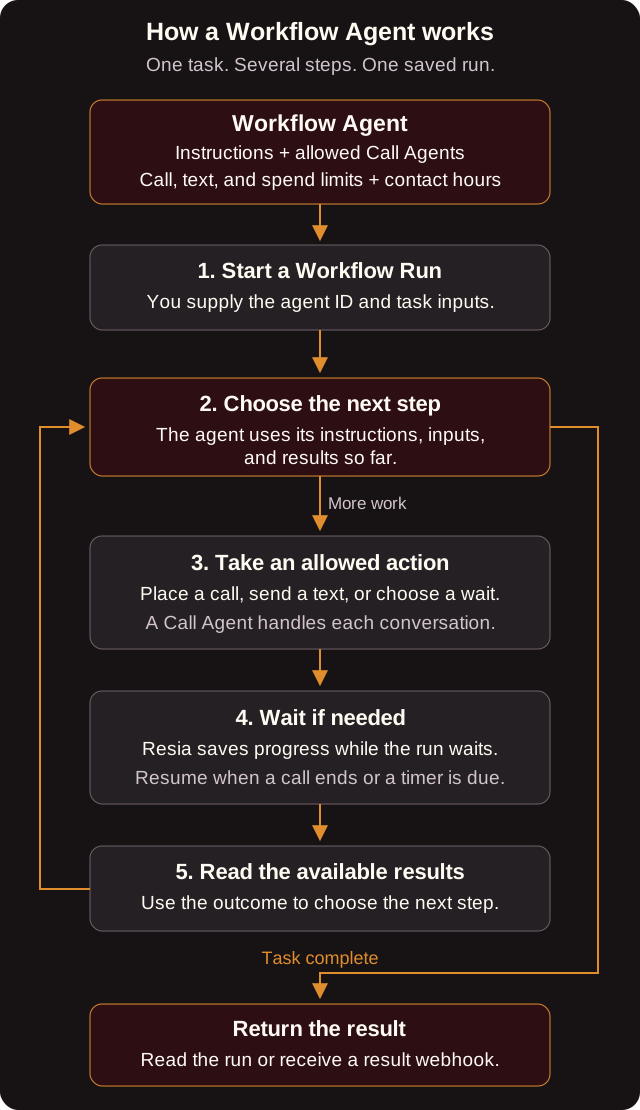
For example, a run can call a patient to confirm an appointment. If nobody answers, it waits until later in the calling window and tries again, within its limits. When the patient confirms, the run finishes with that result in its analysis. The steps depend on the instructions and on what happens. Two runs of the same agent do not have to follow the same sequence.
You do not need a workflow to place one call or to answer inbound calls. Use a workflow when a task needs several steps or needs to wait.
Workflow Agent fields
| Field | Required | What it does |
|---|---|---|
name |
Yes | Unique in your organization. |
instructions |
Yes | The goal of each run and how to reach it. |
input_schema |
Yes | JSON Schema for each run's inputs. |
analysis_prompt, analysis_schema |
Yes | How Resia turns the finished run into a structured result. |
max_calls |
Yes | The most calls one run may place. 0 means the run cannot call. |
max_spend_in_cents |
Yes | The most one run may spend. |
calling_window_start_local_time, calling_window_end_local_time |
Yes | The local times, as HH:MM:SS, between which a run may place calls. |
triggerable_call_agent_ids |
No | The Call Agents that runs may use to place calls. |
max_messages |
No | The most text messages one run may send. The default is 0, which means none. |
triggerable_chat_agent_ids |
No | The Chat Agents that runs may start chats with. This also needs max_messages above 0. |
milestones |
No | Named stages that a run can report, such as reached_patient. Each has a name and a description. |
run_ended_webhook_url |
No | An HTTPS URL that receives workflow_run.ended when a run finishes. |
Every Call Agent and Chat Agent that you list must belong to your organization and must not be archived.
In workflow instructions, $name refers to a run input, and every placeholder must appear in input_schema.properties. Resia gives the validated inputs to the agent as a separate JSON object. It does not replace the placeholder text.
Like other agents, a new or edited Workflow Agent can need review before its runs place production calls. Read review_status.
Calling window and time zone
The calling window has no time zone of its own. Each run reads it in the time zone from inputs.timezone, an IANA name such as America/Los_Angeles. If a run has no timezone input, Resia uses America/New_York. Resia refuses an unknown time zone with 422.
Run status
| Status | Meaning |
|---|---|
queued |
The run is waiting to start. |
running |
The run is working on its next step. |
waiting |
The run is waiting, for example for a call to end or for the calling window to open. waiting_for says what it waits for. |
succeeded |
The run finished. Its result is in analysis. |
failed |
The run could not finish. error_code gives the reason. |
cancelled |
Someone cancelled the run. |
Each run also reports milestone (the last stage it reached) and charges (what it cost so far across calls, messages, and model use).
Limits and money
- A run cannot place more than
max_callscalls, send more thanmax_messagestexts, or spend more thanmax_spend_in_cents. - Runs also count against your organization's call and text rate limits.
- Text replies from a person do not resume a run.
Next step
Run a workflow
Create a Workflow Agent and start a run.

